Our first Tamarac release of 2026 further evolves the enhanced user interface from the past two years with a major update to the billing experience, faster and more efficient data management, and expanded and dynamic reporting options. From selective syncing that saves you valuable time and energy, to updated billing pages and a new, enhanced view in Report Studio, these Envestnet | Tamarac Reporting improvements are designed to help advisors work more efficiently and provide a clearer picture to clients.
Let's explore what's new:
Introducing Selective Sync
Regular data syncs are critical for ensuring you’re working with the most current and accurate information. Based on feedback from our clients asking us to speed up the syncing process, we’ve added Selective Sync. Now you can update specific client accounts – without needing to perform a sync for your entire firm or lose access to a part of the Tamarac experience. Because selective syncs calculate and insert less data than full syncs, they finish much faster and with higher fidelity. Data syncs can now take place while most of the platform remains functional.
Whether you’ve added a new manual security snapshot that needs to appear in reports, or want to refresh custodian account data that wasn’t included in the morning sync, Selective Sync gives you more control over your data. It also helps keep your data up to date.
With zero downtime sync, your data is more readily available and accurate, significantly improving your tool kit and ultimately allowing for more efficient time management with an eye towards focusing on what’s the most important: client relationships.
New UI for Billing pages
As one of the most heavily used features of the platform, the Billing pages have received a refreshed look and feel to match the rest of the recently upgraded user experience. All your normal billing workflows and core functionality remain the same, with updates to the grid layout, header, color scheme, search bar, and icons. You may also find certain tasks in slightly different locations, but everything you need is still there.
The updated pages include:
1. Billing Groups
- A new grid displays all billing groups.
Additionally, you now have the option to:
- Generate billing history, delete, and export billing groups from the Actions list and select Create billing groups from the upper right corner of the grid.
- Expand and collapse items using the grid column. To edit, select the billing group name in a grid row to open the new editing module.
2. Billing Definitions
- A new grid now displays all billing definitions, eliminating the need to select one each time.
- To create billing definitions, select Create in the upper right corner of the grid. The new billing definition module opens.
3. Billing History
- A new grid displays all billing history records.
- Access auto-reconcile and delete functionality from the Actions menu in the upper right corner of the grid.
- Expand and collapse history rows using the grid column.
4. Billing History Status
- The new grid displays all billing history job statuses, and new grid columns now show details that previously appeared in expanded rows, including Requested at, Billing groups selected, Warnings, and Errors.
- To see details of when the status last refreshed, hover over Refresh status.
- Expand and collapse billing history status rows using the grid column.
5. Auto Reconciliation
- The new grid now shows all auto-reconciliation billing history.
- Delete and export data actions from the Actions menu in the upper right corner of the grid.
- Access auto-reconciliation details by selecting the date in a grid row, which then opens an expanded page view.
6. Payment Details
- Before you select a billing group to view, you see a default empty state.
- After you select a billing group, you see relevant results.
- Expand and collapse payment details rows using the grid column.
- Edit payment details by selecting Edit in a grid row, then complete the Edit Payment window.
Report Studio Updates
For the first time ever, you now have the option to manage everything in one place within Report Studio and organize your reports more effectively through better filtering and dynamic reporting views.
Dynamic Reporting
Our latest Report Studio updates introduces more dynamic ways to organize, explore, and present reporting data, starting with new flexibility in how you group accounts.
These dynamic sections are fully configurable, allowing you to evaluate financial accounts, groups, account sets – or, depending on the report, households – without needing to regenerate static files.
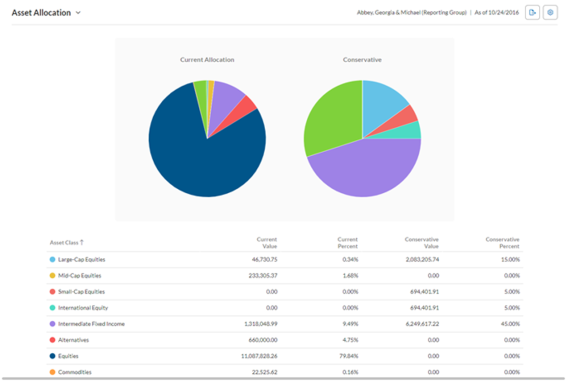
Previously, grouping behavior differed by report type. For example, the Asset Allocation report grouped information by each account member, and the Account Performance report grouped by direct members.
Now, you can choose to group data by direct member or by single account, depending on how you want to analyze and present the information.
• Direct member: Summarize data by groups directly beneath for a big-picture view.
• Single account: Display data for each account individually for in-depth analysis.
Whether you're providing a high-level group view or a granular, account-level view, this added flexibility helps you tell a clearer story about client portfolios, while built‑in guardrails ensure consistency and accuracy within each report.
For more information about dynamic, interactive reports, see Basics of Working With Reports.
PDF Reports
While dynamic reports support an interactive view, PDF reports remain a critical part of delivering polished, professional client communications.
These PDF reports are built for printing and sharing, allowing advisors to create branded financial statements, quarterly reports, and billing documents designed for presentation rather than exploration.
PDF reports allow advisors to:
- Deliver monthly, quarterly, or annual financial statements.
- Present static data in client meetings or on large screens.
- Share or print branded reports for clients who prefer traditional formats.
- Include billing invoices alongside reporting, or as a standalone document.
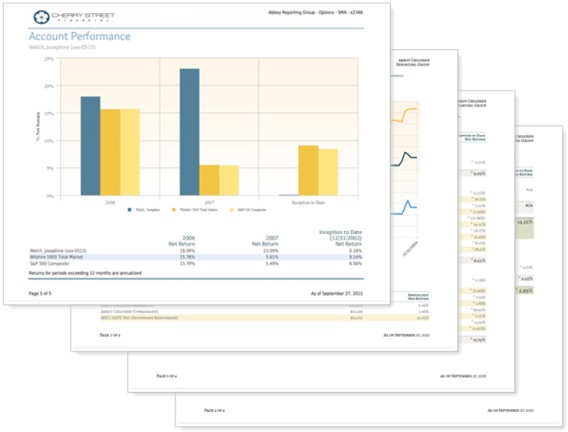
PDF templates can include many of the same performance, holdings, and transaction sections available in dynamic reports. Because PDFs capture a static snapshot of data at a specific point in time, they provide consistency and clarity for formal reporting moments.
Together, dynamic and PDF reporting options give advisors flexibility across every client interaction.
For more information about PDF reports, see Understanding PDF Reports.
Innovation is our 2026 roadmap
As we continue to help you meet the moment, we are working diligently to lessen the friction and pain points in your daily work. We’re excited to bring you these new Tamarac Reporting enhancements – and this is just the beginning of what we’ll be delivering in 2026 to help you work smarter and elevate the client experience.
Visit www.envestnet.com/rias or email us at riasales@envestnet.com to learn more.