Our last release of the year delivers mobile-friendly functionality and flexible new features to elevate the user experience for you and your clients as you wrap up 2025 and head into 2026.
Let’s explore the key updates and how you can use them to elevate your practice:
Tamarac Reporting
Report Builder updates
Report Builder is now Report Studio!
We’re excited to announce that Report Builder has a new name: Report Studio. This rebrand reflects our ongoing commitment to making this tool even more powerful and intuitive. With Report Studio, you can create and customize reports more easily, take advantage of new features that help you work faster, and connect seamlessly with other tools to simplify your workflow.
New Report Studio permissions
We’ve added more granular permissions to Report Studio for greater control over who can create, edit, and manage reports. These permissions help ensure that each user has the right level of access for their role. Permissions include:
- Create, edit and delete private modules
- Delete shared modules
- Edit shared sections
- And more
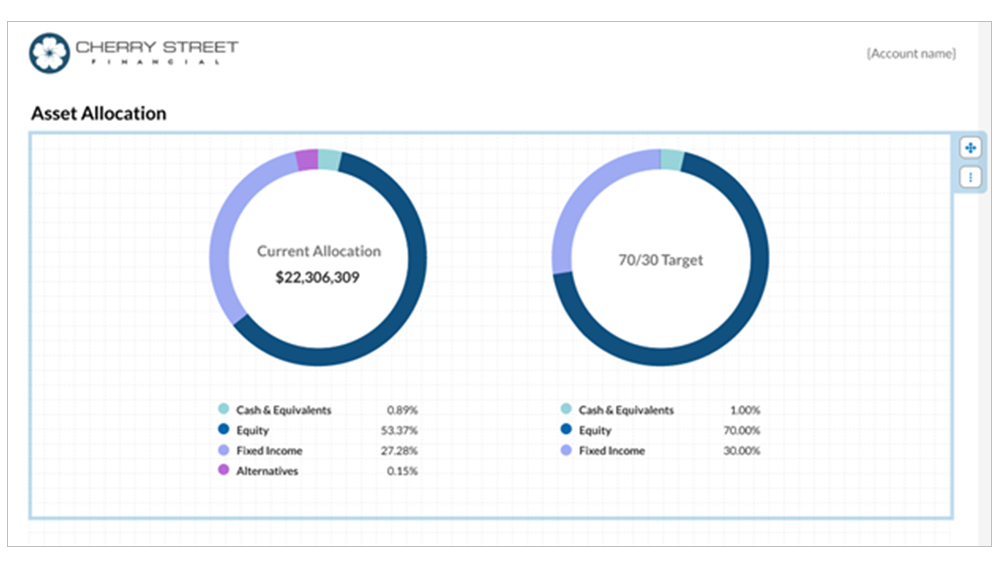
New Pie Chart module
Report Studio's latest addition—the Chart module—gives you greater versatility in creating client reports. This new module brings the familiar Asset Allocation Pie Chart functionality from Tamarac Reporting directly into Report Studio.
New Performance Attribution and Benchmark Contribution columns
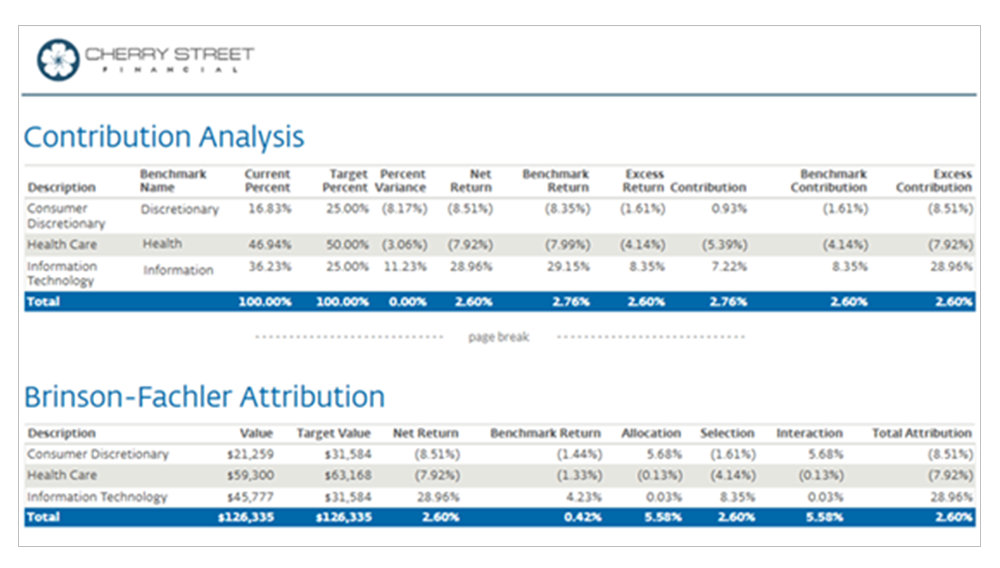
You’ll find new attribution columns in the Target Allocation & Attribution section. These columns appear at the subtotal and total levels when you group data by target allocation.
New Options Reporting capabilities
We know how important it is to provide detailed reporting for clients who trade options. So with this release, Options is now available as a “Group by” category in Report Studio, along with several new options-specific columns such as:
- % In the Money
- Days to Expiration
- Notional Value
- And more
New Holdings and Security Details columns
As part of our ongoing enhancements to Report Studio, we’ve added all security details as available columns. This update gives you access to key information for both holdings and security detail reports.
Client Portal Enhancements
Upgraded mobile and tablet experience
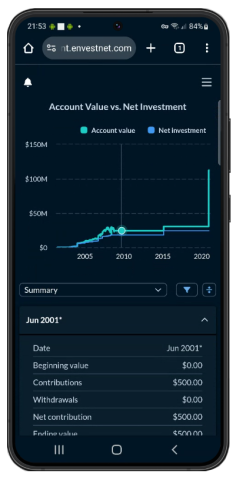
We're excited to announce that your go-to reports are now mobile-friendly, with a responsive mobile app-like experience designed specifically for smaller screens. Now you can review performance on the go or share insights with clients in real time, with data that's easier to access and read on any device. Expect faster workflows, more effective client conversations, and a more polished experience for you and your client.
The following reports have been fully optimized for mobile device users:
- Capital Flows
- Activity

- Account Performance
- Documents
- Projected Income
- Realized Gain/Loss
Custom Disclosure Modal for dashboards
You can now add and display custom disclosures directly in the Client Portal dashboard. Added disclosures will appear in a new disclaimer link in the footer that’s visible across all template-based dashboards, reducing repetitive work and scaling with your practice. Whether you're presenting performance data or portfolio insights, this consistent disclosure feature is designed to simplify compliance, build client trust, and reduce risk.
Classify expenses in the Capital Flows report
Clear, accurate reporting is essential when clients are looking at the portal. While you couldn’t control classifications in the Capital Flows report before, our new update allows you to include expenses that do not reduce Net or Gross performance.
Group SMAs as a single line item on the Account Performance report
The Account Performance report is a cornerstone of your reporting to clients. If you use separately managed accounts (SMAs) though, you may not want to show every underlying SMA holding. To help you simplify the Account Performance report as needed, you can now display separately managed account holdings as a single aggregated line item.
To aggregate SMA holdings, select the new SMA as single line item option.
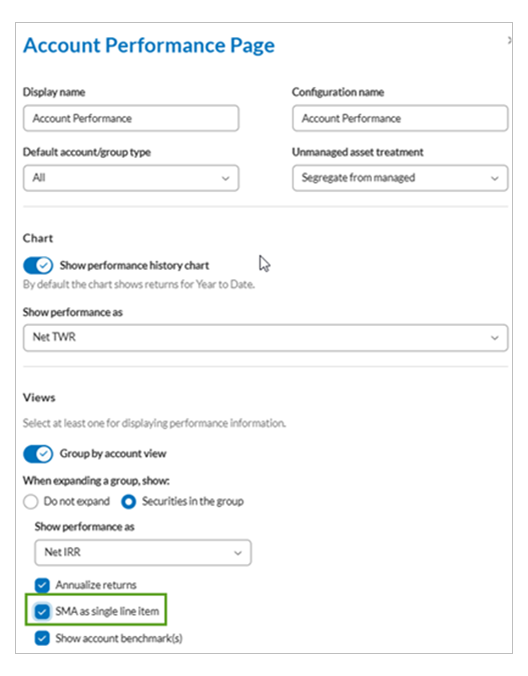
This update reduces report clutter and highlights broader performance metrics for clients who prefer a high-level summary.
Wealth Data Platform
New RIA Experience
This release introduces powerful enhancements designed to elevate your analytics workflow and deliver a more modern, intuitive experience:
- Modernized Experience – A sleek, intuitive interface for deeper insights and better decision-making.
- Dashboard Designer – Build custom visualizations and mashups tailored to your firm’s needs.
- Data Exploration Tool – Quickly access and analyze critical business data with ease.
- Single Sign-On (SSO) – Seamlessly access the RIA Analytics experience from Reporting.
- Integrated Insights – Advanced Decision Intelligence tools accessible within Tamarac Reporting (subscription required).
For questions about your access or if you are not a current subscriber of Tamarac Analytics, please reach out to TamaracAM@envestnet.com
Tamarac Trading
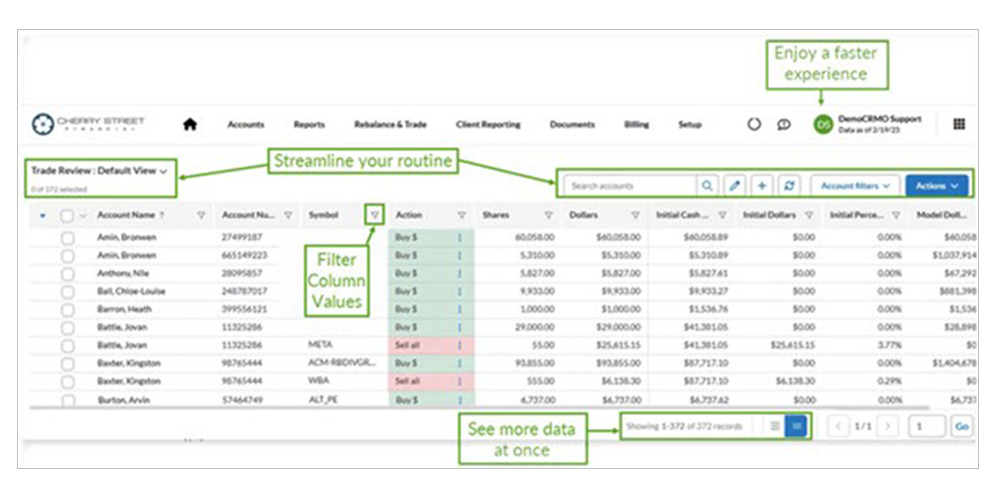
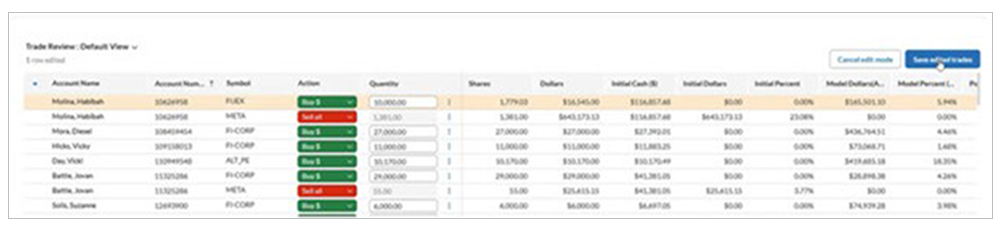
Modernized Trade Review page
The Trade Review page is critical for viewing proposed trades and implementing strategies across your book of business. With this release, we remodeled it to help make your trade review process faster and more intuitive. Read on to see how.
Enjoy a faster experience
We’ve improved page performance so you can edit trades and sort columns more quickly.
Streamline your routine
You’ll find view management, search options, account filters, and page actions at the top of the page for easier access and more workspace for your data.
See more data at once
The new compact default view maximizes vertical space and displays more entries at once. The page record view count has grown from 100 to 1,000 records.
Filter column values
Trade Review holds many entries, and we’ve enhanced column filtering for more types of columns so you can choose which values to focus on.
Trading Dashboard makeover
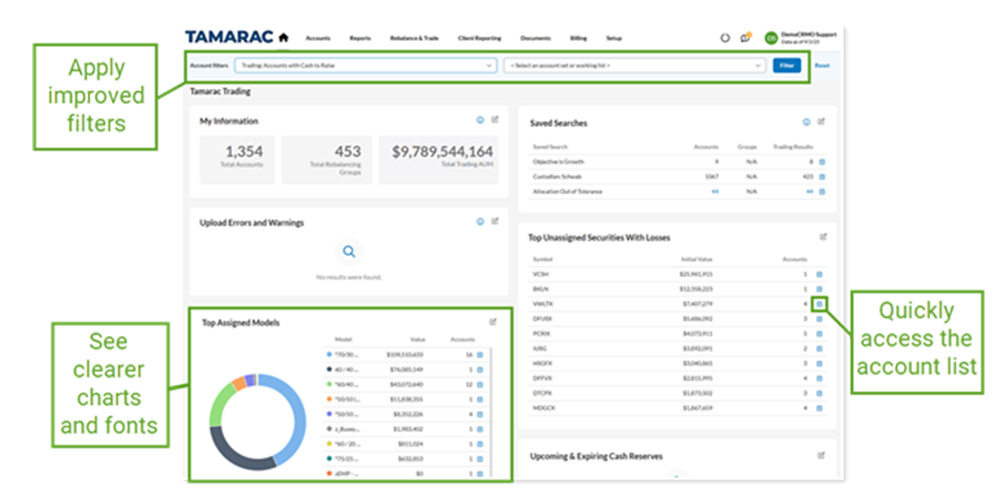
The remodeled Tamarac Trading Dashboard gives you a comprehensive, intuitive overview of events and account details—including trading AUM, cash reserves, security details, and models—all in one place. It’s designed to bring clarity and efficiency to the start of your trading day, helping you focus on the information that matters most.
We’ve redesigned the dashboard to include:
- Improved filters. Apply Saved Searches, Account Sets, and Working Lists to customize account-specific widgets and view the insights most relevant to you.
- Quick access to account lists. Press a button to view accounts that may need your attention.
- Clearer charts, graphs, and fonts. Enhanced visuals make it easier to assess your book of business and identify possible trading actions.
Tamarac CRM
Enforced session timeouts to improve CRM data security
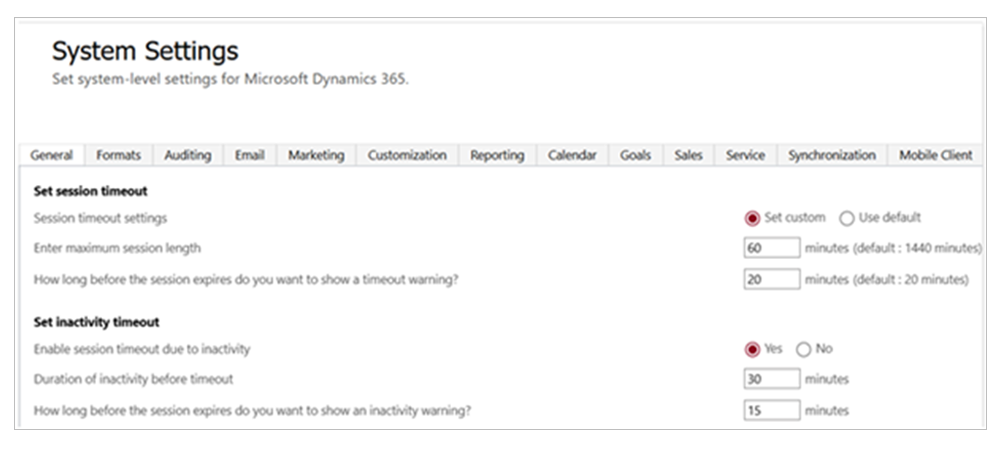
To protect your client data, we’ve updated our system to automatically sign you out of your CRM session after a set time and enter credentials periodically to prove you’re you. This new feature is designed to keep information safe and secure and make it harder for anyone to get into your account without permission.
With this change, CRM will:
- Sign you out automatically after 60 minutes of inactivity
- Require you to sign in every 12 hours by default
- Alert you before your session expires, allowing you to save your work and proactively sign in to continue your session.
The default session timeout settings will automatically enable for all firms and CRM users, including:
- All enterprises that have Microsoft’s default timeout settings enabled
- All enterprises that have no timeout settings enabled for Tamarac CRM
Integrated Schwab alerts now simplified to a 30-day history
For Schwab integration users, syncing Schwab Advisor Center alerts and statuses to financial accounts records in Tamarac CRM makes it easier to stay on top of operational workflows and address client needs as they arise.
Previously, the integration synchronized the last 18 months of Schwab alert history to CRM, but with the recent changes to Schwab’s alert system, CRM now syncs only the past 30 days of alerts. This helps improve load times and focuses data refreshes on the most timely and actionable alerts.
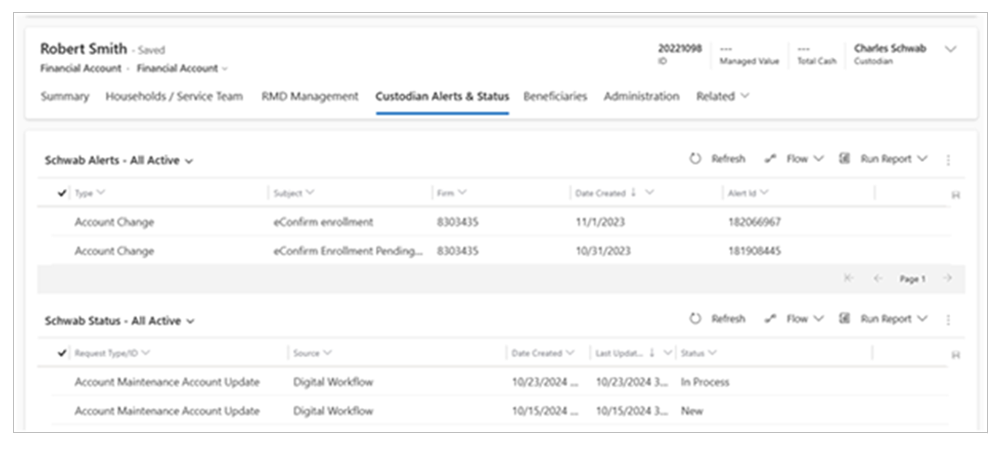
To preserve the alert audit trail in CRM, historical alerts synced from Schwab remain available on the Custodian Alerts & Status tab of a financial account for 18 months. Any updates to alerts in Schwab Advisor Center will not sync to CRM after the 30-day window. For more information and steps to enable this integration feature, see Schwab alerts and statuses in CRM.
Looking ahead to 2026
As 2025 comes to a close, we want to thank you for being part of the Envestnet Tamarac community. And stay tuned—there will be a lot more features and improvements coming to help you serve more clients, more efficiently, in 2026 and beyond.
Visit www.envestnet.com/rias or email us at RIASales@envestnet.com to learn more.